Swati Mishra

Updated 2 months ago

Convert your mobile into a webcam.

Do you want a decent webcam without spending a fortune in the process? If you have an Android device with a camera, this problem is solved. You will only need DroidCam, an application capable of turning your mobile or tablet into an improvised webcam. If you want to know what DroidCam is and how it works, stay with us. 

Top Recommended Alternative

What is DroidCam?

DroidCam is an application that allows users to turn their Android device into a webcam for their computer. It is a very useful solution for those who do not have built-in or external cameras on their PC, or simply want to improve the quality of their hardware.

However, you should keep in mind that the DroidCam app can only be used by Android devices, which leaves iPhones out of the equation. Currently, the application can only connect to Windows and Linux. Like iOS, compatibility with macOS is neither here nor there, at least for now.

What is DroidCam used for?

Thanks to DroidCam, you can use any Android device to hold conferences, meetings, or video calls from the comfort of your computer.

Some of the interesting features of DroidCam include the ability to stream video at 720p. It also has a function called FPS Boost, which allows us to double the number of FPS captured by the camera and make our broadcast feel smoother. Within DroidCam, we can control aspects such as brightness, contrast, and even activate continuous focus. All of this will make the resulting image look as good as possible.

With DroidCam, your Android device can also be used to livestream on platforms like Twitch or YouTube. In fact, it could serve as a security camera if needed. DroidCam is compatible with a multitude of programs and applications, making it an extremely versatile option.

However, you should consider DroidCam as a temporary solution. A dedicated webcam will always be faster and easier to use in any situation.

How to use DroidCam?

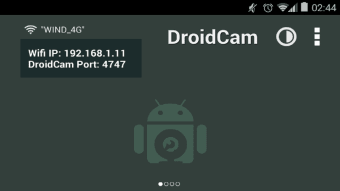
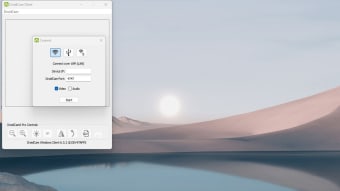
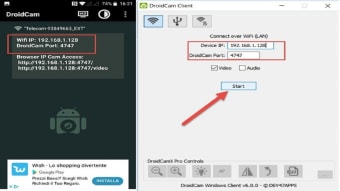
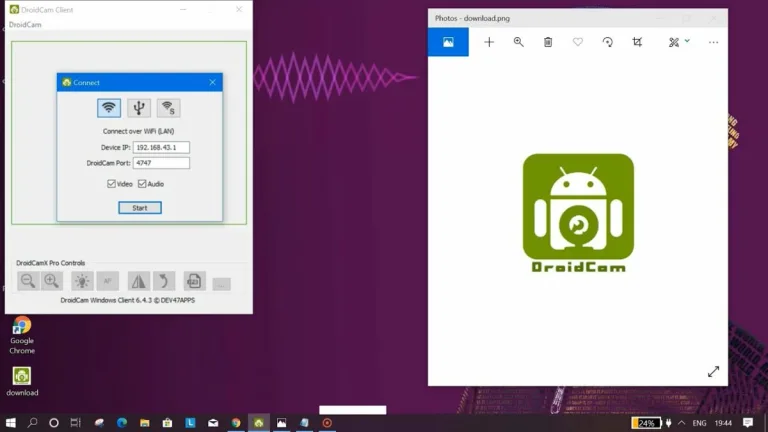
When using DroidCam, it is essential that both our Android device and our PC have an active internet connection. In addition to downloading the application on Android, it is also necessary to install the DroidCam client on the computer. From there, simply follow the instructions that appear in the application to have your improvised webcam.

Take advantage of your devices to enjoy a quality webcam

In the end, DroidCam is a very useful and flexible tool that will allow you to take advantage of the incredible cameras that numerous Android devices have today. It is a very valuable application in work and personal environments, thanks to its compatibility with a multitude of applications. 
Swati Mishra

Swati has over a decade of experience in content strategy, SEO, and editorial writing across technology and travel. She specializes in technical reviews, structured guidelines, and long-form pieces. Her work focuses on clear organization, search intent, and practical takeaways for readers evaluating software and digital tools.


  • Pros

    • Clear usage instructions in the application
    • It works on Windows and Linux.
    • Practical and safe
  • Cons

    • It can be complicated to set up in inexperienced hands.
    • No está disponible en iOS ni en macOS.(Translation: It is not available on iOS or macOS.)
 0/3

App specs

Program available in other languages


User reviews about DroidCam

3.8

5 reviews

Add review

Main reviews for you

  • Anonymous user

    Works like a charm. Unfortunately no uninstaller that either Window 10 or Revo can find. Can not get this off my system now! I hate that. So, zero stars from me!

  • Anonymous user

    I love this app. it's amazing for online teaching on app's like Zoom. It's great for playing physical card games like Magic: The Gathering online on SpellTable.I can't say enough about how amazing this app is, it saved me from buying a webcam! All you need to do now is buy a tripod that holds your cellphone or a cellphone mount for a tripod you already own and you're in business (cheapo hack... just use elastic bands on your tripod!).Thank you so much to the developers of this app, I'm probably going to buy the paid version. Better yet it's never crashed once.

  • Anonymous user

    Is realy good works perfectly. One problem is that ome doesent find my cam. Its just loading

  • Anonymous user

    Easy enough to set up, but I found it a bit laggy and it had a few momentary freezes.

  • Anonymous user

    It is not the best for beginners or people with chromebooks.. i think that droidcam is very hard to use if you have a chromebook or if you are not skilled with computers.

More

You may also like

Alternatives to DroidCam

Explore Apps

Related Articles

Latest articles

Laws concerning the use of this software vary from country to country. We do not encourage or condone the use of this program if it is in violation of these laws.
Softonic

Is DroidCam safe?

100/100

Score result: Clean

This file passed a comprehensive security scan using VirusTotal technology. It is safe to download.

  • Virus free
  • Spyware free
  • Malware free
  • Verified by Security Partners

    VirusTotal logo

Scan Info

Last scan
Wednesday, August 13, 2025
Scan provider
VirusTotal · Full report

File Integrity

File
DroidCam_V7.1.0.exe
SHA256
23d9c838624de3e46aa4ac7a15f6e6cca1072c6c04b8b1457e09ad75c7b0119c
SHA1
5b5c329d1b8b73233541ce148702cc54935c3813

Softonic security commitment

DroidCam has been thoroughly scanned by our advanced security systems and verified by industry-leading partners. This file comes from the official developer and has passed all our security checks, showing no signs of viruses, malware, or spyware. For more information, visit our Security and Trust Center